> ## Documentation Index
> Fetch the complete documentation index at: https://hercules.app/docs/llms.txt
> Use this file to discover all available pages before exploring further.
# Manage apps
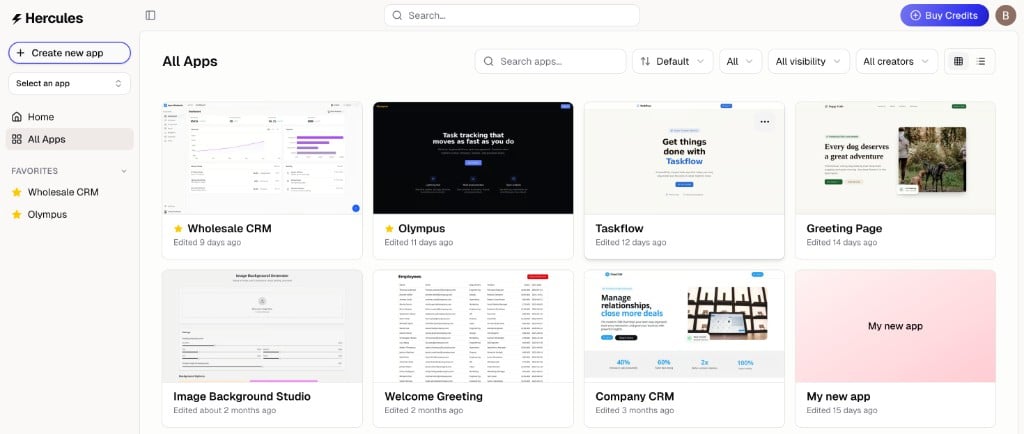
> Manage your apps from the Hercules dashboard. View, duplicate, delete, and transfer apps between organizations.
Manage all your apps from the Hercules dashboard. View, duplicate, delete, and transfer apps between organizations.
### What is my app's URL?
Your organization and app names are both in the address, so an app you are editing looks like `hercules.app/org/your-team/app/your-app`. The browser tab carries the app's name too.
This makes working on several apps at once easier:
* Open each app in its own browser tab and read the tab titles to tell them apart
* Each tab holds its own organization, so opening a second one does not switch the first
* Send a teammate a link and it opens the app you meant
Your app's name in the URL comes from its title when you create it. Renaming the app later does not change a URL you have already customized. Older links that use an app's ID still work and redirect to the new address.
Your apps live at `hercules.app/org/your-team/app`, where `your-team` is the organization you are in. Use the organization switcher at the bottom of the sidebar to move between them.
[hercules.app/dashboard/app](https://hercules.app/dashboard/app) also works and sends you to your default organization, which may not be the one you were last looking at.
See [Transfer an app](/docs/apps/app-transfer) for how to move an app to another organization.
There are two ways to delete an app, depending on your device.
**On desktop:**
1. Go to your organization's app list
2. Hover over the app and click the three dots (**More**)
3. Click **Delete**
**On mobile:**
1. Open the app
2. Tap **More** → **Danger Zone**
3. Tap **Delete**
Deleting an app is permanent and cannot be undone. It removes the app, all of its data, and any associated resources.
1. Go to your organization's app list
2. Hover over the app and click the three dots
3. Click **Duplicate**